Your cameras see every violation.Now they stop it.
What Atlas flags in this clip
- Helmet and vest check running on this cameraMonitoring
Quasi Safety turns the CCTV you already own into a safety inspector that never blinks. It checks PPE on every person, guards restricted zones and fence lines, and catches the first frame of fire or smoke. Violation to WhatsApp alert, with photo evidence, in seconds.
Works with Hikvision, CP Plus, Dahua and any ONVIF or RTSP camera.
Why teams run Atlas
One prevented incident pays for years of Quasi Safety.
Incidents stop early.
Missing PPE and zone entries are flagged the moment they happen, not found in the weekly safety review after someone is hurt.
Compliance gets proven.
Every alert carries a snapshot, camera and timestamp: an evidence trail ready for any audit, insurer or inspector.
Productivity gets visible.
Idle minutes, manpower and unmanned stations measured from the same cameras. No timesheets, no guesswork.
- Violation to WhatsApp alert with snapshot
- Seconds
- Every zone, every shift. No fatigue, no blind spots
- 24/7
- New cameras, sensors or rewiring
- 0
- From CCTV feeds to first alert
- <1 week
From the field
Every alert carries its evidence.
The snapshot, zone, camera and time go to the shift in-charge on WhatsApp. Unacknowledged alerts escalate, and every event lands in the violation log.

Quasi Atlas · SafetyUnit 2 · Safety command
32 cameras online, all zones armed
- PPE compliance today
- 96.4%
- Violations today
- 14
- Restricted entries
- 2
- Avg acknowledge time
- 41 sec
Packing line 2Live
92%PPE compliant · 8 in frame
Last flag 14:22No vest
Kiln feed, restrictedAlert
1unauthorised entry · 09:14
Snapshot sentAcknowledged
Perimeter, north fenceClear
0intrusions · night armed
Last event 3 days ago
| Time | Zone · camera | Event | Status |
|---|---|---|---|
| 14:22 | Packing line 2 · Cam 07 | No safety vest · confidence 0.92 | Alerted |
| 13:41 | Furnace bay · Cam 03 | Smoke · first frame | Escalated |
| 02:38 | North fence · Cam 21 | Boundary intrusion · night | Resolved |
Swipe the table for more
 Quasi Safety
- Today
- Restricted zone entryKiln feed · Cam 12Today 09:14:31 · snapshot attached9:14 AM
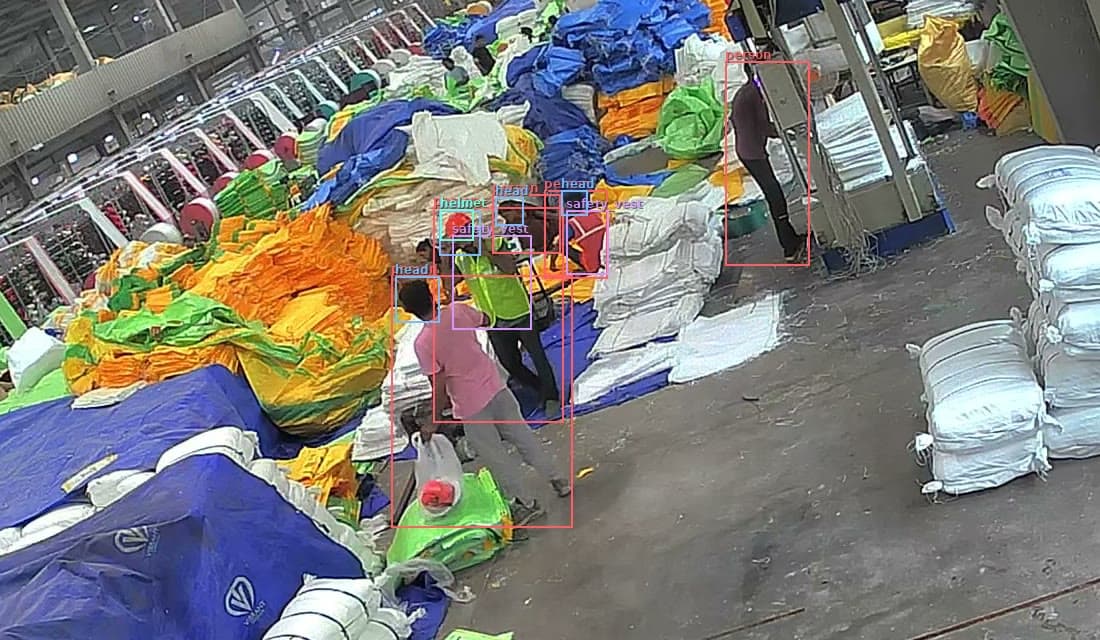 Safety alert · No helmetRoll stock area · Today 12:31:25Shift in-charge notified12:31 PM
- Smoke · first frameFurnace bay · Cam 03Escalated to site head: 60 s unacknowledged1:42 PM
How it works
From CCTV feed to first alert in under a week.
Connect
Plugs into the CCTV and RTSP feeds you already run. No rewiring, no stoppage.
Watch
Every frame checked against your rules: PPE per zone, restricted areas, fence lines, fire, smoke.
Alert
WhatsApp and email with a snapshot, straight to the shift in-charge. Unacknowledged alerts escalate.
Prove
Every event logged with evidence. Compliance by zone, shift and contractor, ready for audit.
- Cameras
- HikvisionCP PlusDahuaONVIF / RTSP
- Alerts and records
- WhatsAppEmailCSV exportREST API
What it sees
Flags every violation your cameras can see.
Every frame is checked against your rules: PPE per zone, restricted areas, fence lines, fire and smoke.
- Hardhat
- Safety vest
- Mask
- Gloves
- Goggles
- Restricted areas
- Boundary intrusion
- Fire
- Smoke
- Vehicle proximity
- Idle time
- Headcount per zone
+ rules you define
Where it runs
What it catches on your site.
Mines & quarries
PPE at the face, haul-road and bench intrusion, vehicle and person proximity. Evidence logged for DGMS scrutiny.
Cement
Kiln, crusher and clinker zones guarded, hot-work PPE enforced, and packer-line idle time measured per shift.
Steel & metals
Furnace-bay exclusion zones, molten-metal PPE, and first-frame smoke caught before a sensor ever trips.
Automotive
Press-shop and weld-line PPE, forklift and AGV proximity, unmanned stations and line idle time.
Pharmaceuticals
Gowning, mask and glove compliance at cleanroom entry, and restricted-area control with an audit-ready trail.
Warehousing
Dock and aisle safety, forklift and person proximity, and night-time boundary intrusion on yards and gates.
Do we need new cameras or sensors?
No. Quasi Safety plugs into the CCTV and RTSP feeds you already run. No new cameras, no sensors and no rewiring.
What can it detect?
Hardhats, safety vests, masks, gloves and goggles, restricted areas, boundary intrusion, fire, smoke, vehicle proximity, idle time and headcount per zone, plus rules you define.
How fast does an alert arrive?
In seconds. A WhatsApp and email alert with a snapshot goes straight to the shift in-charge, and unacknowledged alerts escalate.
Will the records hold up in an audit?
Every event is logged with a snapshot, camera and timestamp, and compliance is reported by zone, shift and contractor.
How long until it is running?
Under a week from CCTV feeds to first alert.
What does a pilot look like?
A live pilot on one line or one gate: your cameras, your zones, your PPE rules, running in under a week. No new hardware and no long contracts. If it doesn’t prove itself, walk away.
Live pilot
Watch it catch a violation on your own cameras.
A live pilot on one line or one gate: your cameras, your zones, your PPE rules, running in under a week. No new hardware and no long contracts. If it doesn’t prove itself, walk away.
- Live in under a week
- Your cameras
- No lock-in
Part of Quasi Atlas.
Every product runs on one platform, one data layer and one console. Start with one and add the next when you are ready.